
Hik-Connect
Screenshots
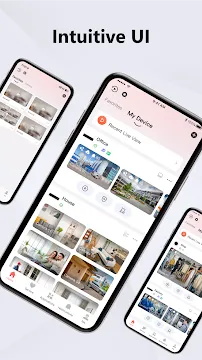
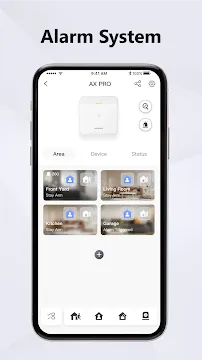
Hik-Connect is a unified remote monitoring platform built to link your mobile screen with smart hardware devices seamlessly. It connects with your video recorders, security network cameras, and smart villa intercom systems from anywhere. Protecting your property requires continuous attention, so having a direct video feed provides incredible convenience. Then, you can verify your household safety or business operations within a few seconds. This article explains how the Hik-Connect platform functions and improves your security management strategy.
What is the Hik-Connect Surveillance Platform?
Hik-Connect operates as a modern cloud-based remote management tool for physical security infrastructure. The software connects your smartphone to advanced digital video recorders and outdoor network cameras. Then, you can watch crisp video streams across cellular networks or private wireless internet connections. It accommodates many hardware configurations, including network video recorders, security speed domes, and entry controllers.
Property administrators do not need to sit inside an office room all day. Instead, Hik-Connect gives you full access to your entire security setup from any geographic location. The initial linking sequence is straightforward because you only scan a specific hardware QR code. After that step, you unlock immediate operational visibility over your private or commercial property.
Many business owners rely on this platform to keep their inventory safe. You can organize separate physical sites within one clean control screen. For instance, you can check your primary residence, retail shop, and shipping facility together. Then, you can switch between active cameras with a simple tap on your phone glass.
How Hik-Connect Facilitates Real-Time Live Streams
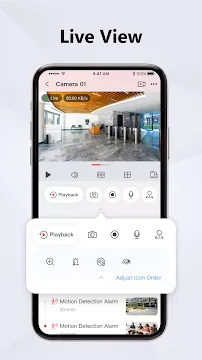
The live monitoring capability serves as the foundational pillar of the Hik-Connect security management experience. Users open the video screen to inspect daily physical activities around their buildings immediately. Then, you can ensure employee productivity or family safety without experiencing long data delays. The stream window renders clear visual zones even during long-distance international travel away from home.
To achieve maximum stream stability, you must establish a reliable internet connection. The system easily manages multiple video channel arrays on a single dashboard screen. Consequently, you can watch four, nine, or sixteen distinct cameras simultaneously. This split-screen organization helps you track suspect behavior across different warehouse corridors or perimeter fences.
- You can toggle between basic definition and high definition to manage data usage.
- The software lets you take snapshot images of critical moments during live streaming.
- You can save short video recordings directly to your smartphone storage during real-time views.
If your camera possesses motorized pan, tilt, and zoom mechanics, you can guide those actions remotely. You just swipe across your smartphone display to change the direction of the camera glass. Then, you can zoom inward to read distant delivery vehicle plates or identify building visitors.
Exploring Hik-Connect Video Playback Options
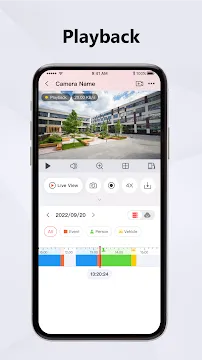
Reviewing past recordings remains necessary when you must investigate internal workplace mistakes or external break-ins. Therefore, Hik-Connect provides an interactive video playback utility to explore historical video files. You locate specific occurrences by picking an exact calendar date and hour from the search tool. Then, the visual timeline highlights instances of recorded movement for instant observation.
The user interface utilizes distinct color blocks along the timeline indicator to separate standard recordings from alarms. For example, continuous scheduled recording appears blue, while specific motion alerts show up as yellow markers. This clever design pattern saves your time because you do not watch hours of empty rooms. Instead, you jump straight to the exact moments when an unusual event happened.
- Choose the precise camera channel that corresponds with the incident location.
- Filter your historical database search by specific event attributes like line crossing.
- Export vital video evidence snippets directly into your personal smartphone file directory.
When you discover the essential video clip, you can export the data package smoothly. You should download these items into your local phone folders before sharing them with your team. This step guarantees that your files remain fully readable across common mobile video player utilities. Then, you can present indisputable visual proof to local police officers if property damage occurs.
Managing Instant Alarm Messages in Hik-Connect
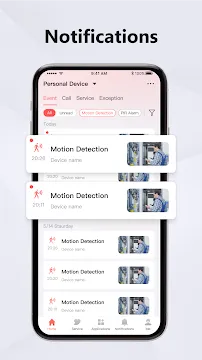
A property defense setup only succeeds when it informs you about potential dangers instantly. For this specific purpose, Hik-Connect features a high-speed cloud push alert system. The software drops urgent warnings onto your phone notification center the exact moment a sensor trips. Then, you click the message pop-up to launch a real-time stream of the affected zone.
You can adjust the warning configurations to mirror your daily office hours or weekend schedules. For example, you might choose to receive alerts only during nighttime hours at your store front. This choice stops your mobile phone from vibrating repeatedly while your team members perform their tasks. You can subscribe to different alert behaviors depending on your ultimate safety objectives.
- Motion alerts trigger when a moving silhouette passes your camera view zone.
- Intrusion alerts activate when an unauthorized person steps over a digital boundary line.
- Defect alarms notify you if a camera loses network connection or stops recording.
When an unexpected alert reaches your screen, the platform shows a brief video playback clip. This design allows you to diagnose the threat level within a couple of seconds. Then, you can determine if the warning demands an emergency call or if wind moved a tree branch.
Access Control and Intercom Connection via Hik-Connect
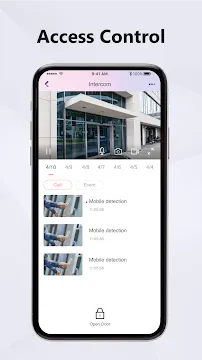
Advanced property protection requires more than simply observing remote video feeds on a mobile phone screen. Thus, Hik-Connect incorporates access control systems to govern entry boundaries and security doorways. You can attach smart electronic locks, card readers, and video entry stations to the main software dashboard. Then, you can converse with people at your front gate and unlock the entry mechanism.
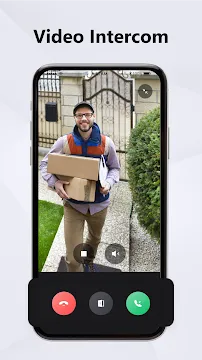
The video intercom subsystem supports excellent two-way conversation with clear audio and video attributes. When a delivery driver presses your outdoor bell button, your phone rings like a standard incoming call. Then, you can see the visitor and talk to them to provide drop-off instructions. This option improves building safety because you confirm employee credentials before unlocking the entrance door.
Surveillance monitoring is usually a shared obligation among household members or corporate security teams. Therefore, Hik-Connect features a secure hardware sharing architecture to delegate access safely. You pass camera access to other registered users by typing their account emails or telephone numbers. Then, you set explicit operational boundaries for each secondary profile.
- Primary administrators can stream video, alter system properties, and reset alarm modules.
- Operators can only watch real-time feeds without modifying the master device layout.
- Temporary guests receive short-term viewing access that terminates after a set duration.
This strict identity frame ensures that unauthorized users cannot alter your digital video recorder adjustments. You can cancel shared viewing rights instantly if your employee roster changes or a device gets lost.
Conclusion
Hik-Connect offers an excellent path to oversee your physical safety hardware from any global position. The platform merges real-time video streaming, simple historical playback, and immediate notification updates into a single environment. Then, tools like doorway access control and identity sharing supply extra convenience for modern homes and commercial enterprises. You can safeguard your assets and watch over your workforce easily by deploying these software capabilities. The system configuration is user-friendly, and the notification engine keeps you updated every single day.